Telemesure, a Grolleau solution

Your equipment talks to you. Telemesure lets you know.

Temperature probes, meters, GPS trackers, technical cabinets: their readings arrive in a single web portal and on your phone. You see the status of all your devices, the right person is alerted at the right time, and you can control some devices remotely.

Already a customer? Go to the Customer area

Screenshots of the Telemesure portal and app, demo data

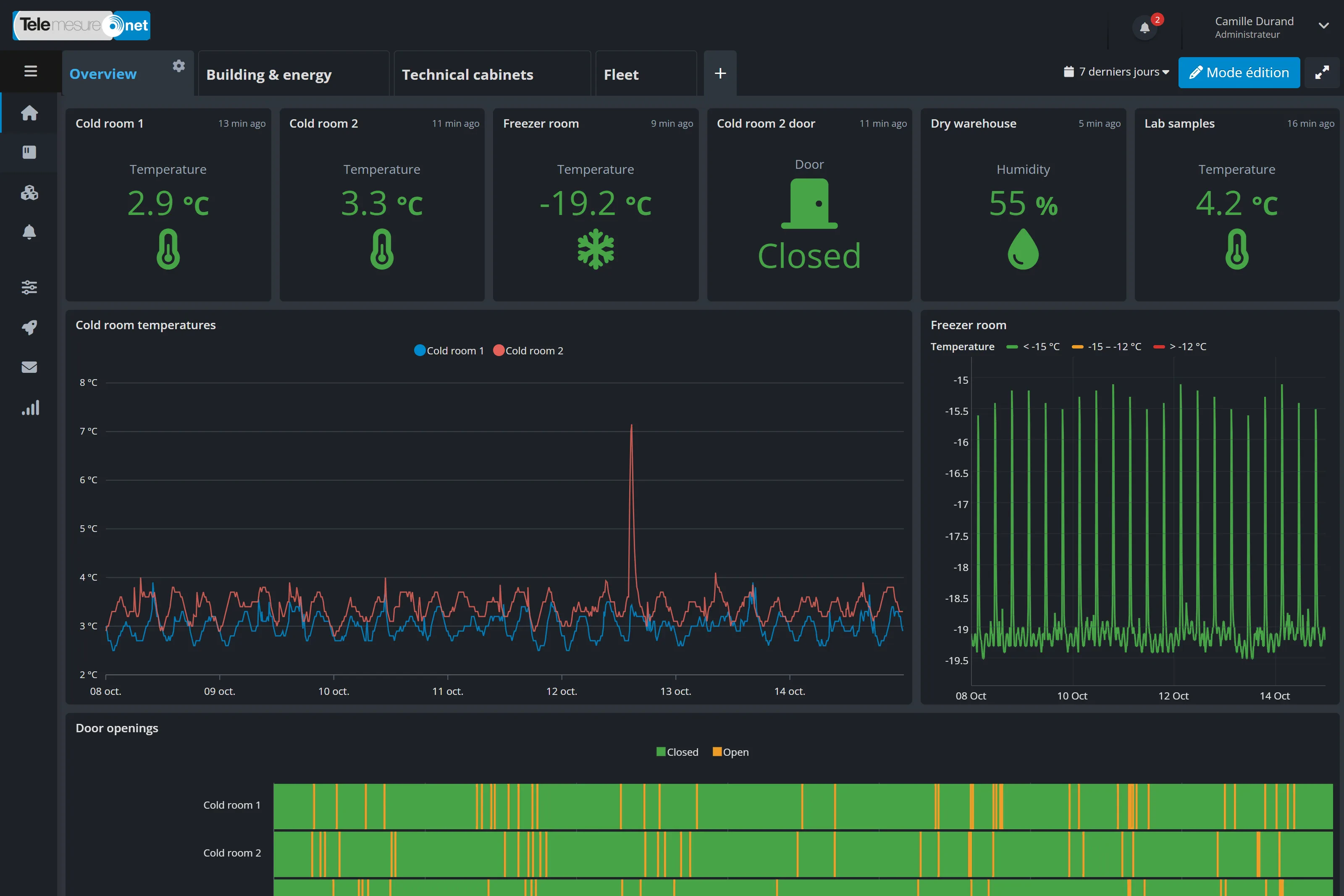
Enlarge the screenshot: “Overview” dashboard of the Telemesure portal in dark mode: latest values for the two cold rooms, the freezer room, the door, the dry store and the sample fridge, temperature charts of the two cold rooms over 7 days with a rise above 7 °C, and the freezer room with its coloured thresholds
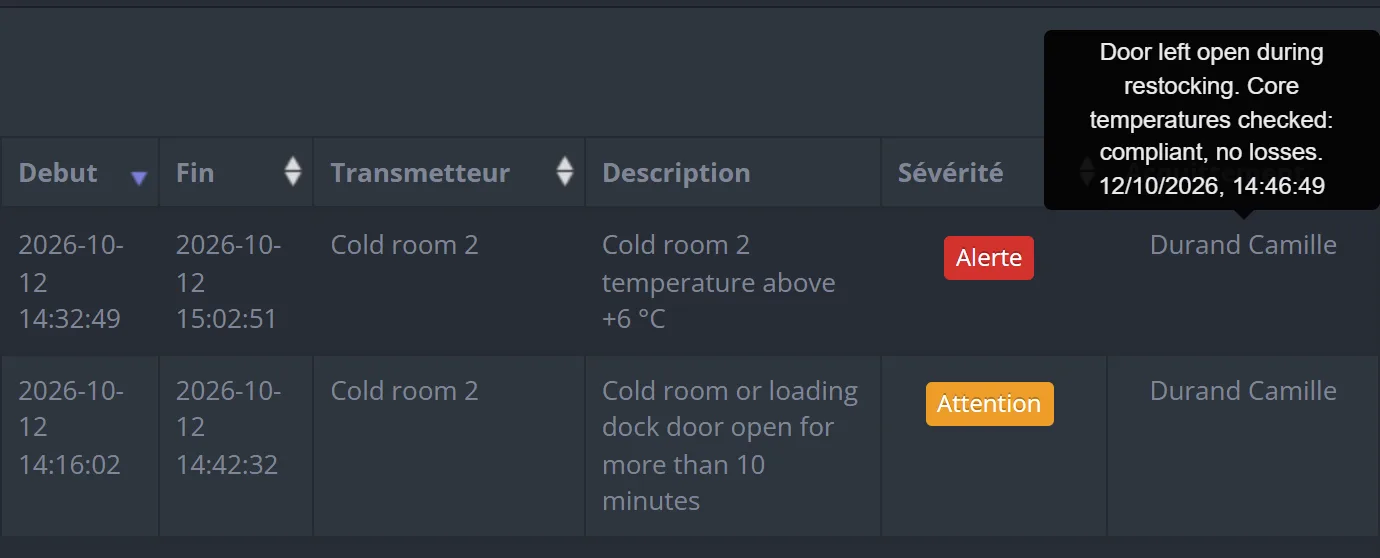
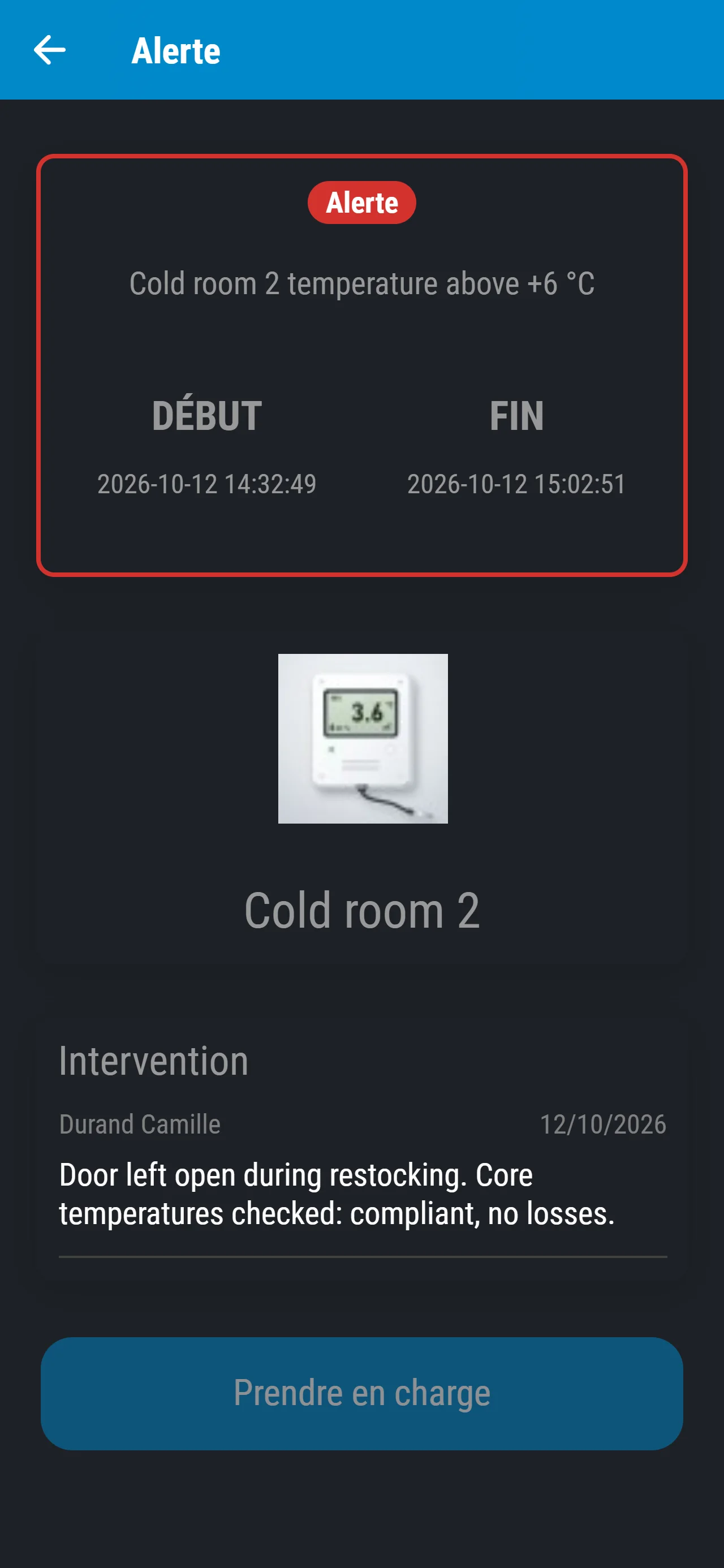
In the portal, the resolved alerts for cold room 2, temperature above 6 °C (Alert) and door open (Warning), acknowledged by Camille Durand, whose comment appears in a tooltip Enlarge the screenshot: The Telemesure mobile app, details of an alert with a photo of the probe: cold room 2 temperature above +6 °C, on 12/10/2026 from 14:32 to 15:02, and Camille Durand’s intervention: “Door left open during restocking. Core temperature of the products checked: compliant, no loss.”
  • More than 20 manufacturersof sensors supported

  • Four ways to be alertedemail, text message, voice call, push notification

  • Web portal and appon computer, Android and iPhone

  • Hosted in Franceby Scaleway and OVHcloud

What Telemesure changes for you

Know what is happening on your sites, without going there

Telemesure brings together the readings from your equipment, spots anything out of the ordinary and alerts the right person. You stay in control, from your office or out in the field.

  • All your devices in one portal

    Your sensors can come from different brands and run on different networks: as long as their model is supported, everything arrives in the same portal. You see what is working and what has gone silent.

  • Alerted at the right time

    A cold room drifting overnight, a door left open, a device gone silent: the right person is alerted by email, text message, voice call or push notification, depending on the severity and the time of day.

  • Act remotely

    You check readings without travelling, acknowledge an alert from your phone and control some devices remotely, for example to programme an air purifier.

  • Data that works for you

    Dashboards, spreadsheet export, PDF reports by email and automatic forwarding of readings to your own software.

How it works

From reading to action

Let’s follow an alert from start to finish. The scenario: the cold room of a fresh-produce distribution centre, on a restocking afternoon. Each step is illustrated by the matching portal screen, with demo data.

Example scenario Cold room no. 2 alert above 6 °C

Colour code

  • All good
  • Warning
  • Alert
  1. Step 1: A sensor takes a reading

    A probe installed in the cold room measures the temperature and whether the door is open, and sends its readings at regular intervals. This afternoon, during restocking, the door has been left open: the temperature rises, and the probe records more than 6 °C.

    Good to know. To add a sensor, you enter its activation code in the portal or in the mobile app, and the device appears in your account.

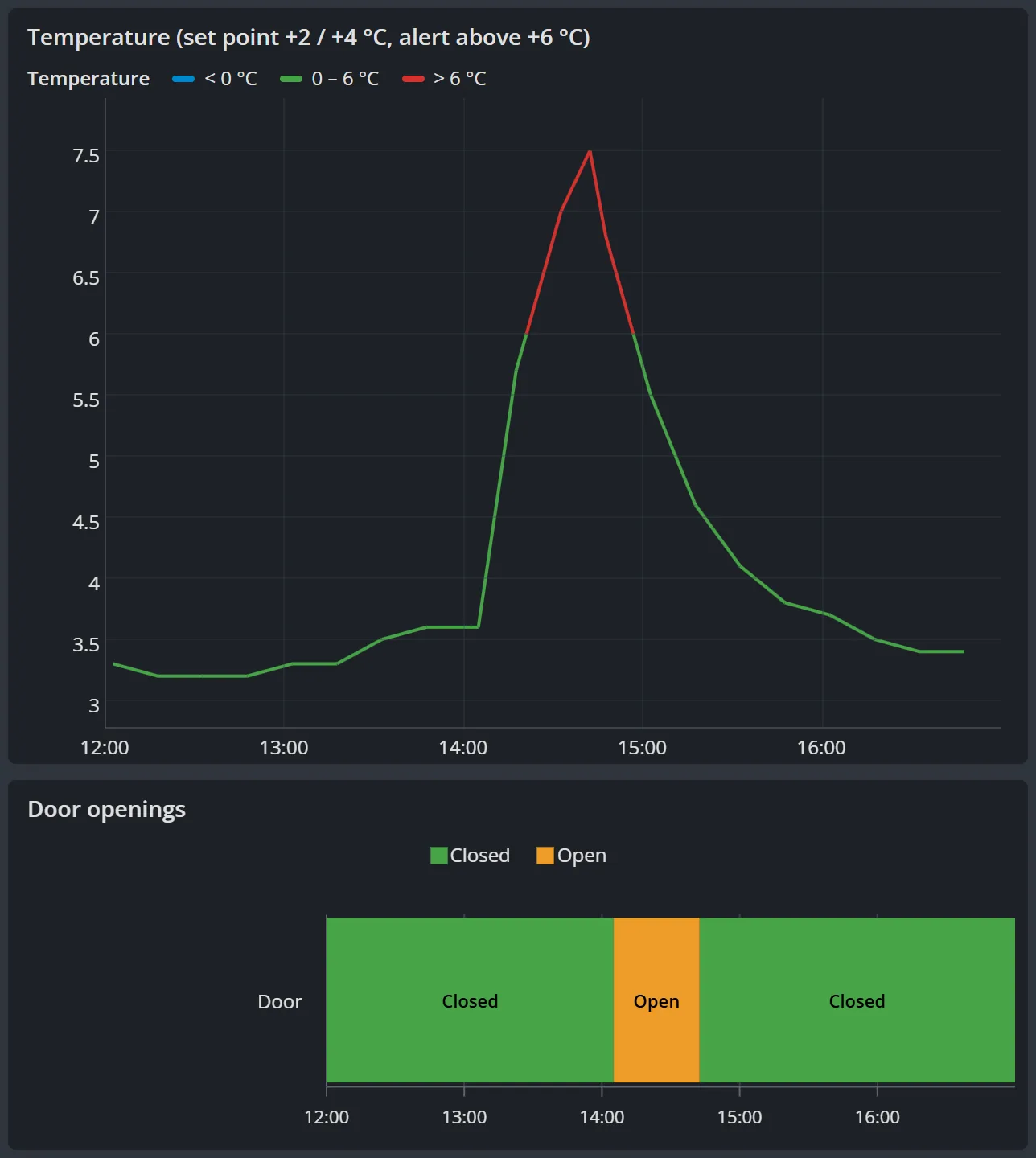
    Enlarge the screenshot: Page for cold room 2 in the portal on the restocking afternoon, from 12:00 to 17:00: the door timeline turns orange (open) shortly after 14:00, and the temperature chart rises from 3.5 °C to 7.5 °C, red above 6 °C, before falling again once the door is closed
    The probe’s page that afternoon: the door stays open (in orange) and the temperature goes above 6 °C (in red) (demo data)
  2. Step 2: The network carries it

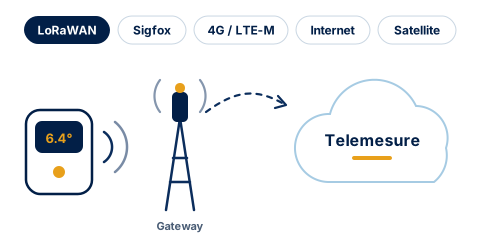
    The reading travels over the network best suited to the site. Here, it is LoRaWAN: a long-range radio network that uses very little energy, designed for sensors. Each sensor model speaks its own language: for supported models, Telemesure automatically translates it into readable values.

    Good to know. Other networks are possible: Sigfox, the 4G mobile network, the Internet or satellite. Poor coverage on a site? A private LoRaWAN gateway can be installed there.

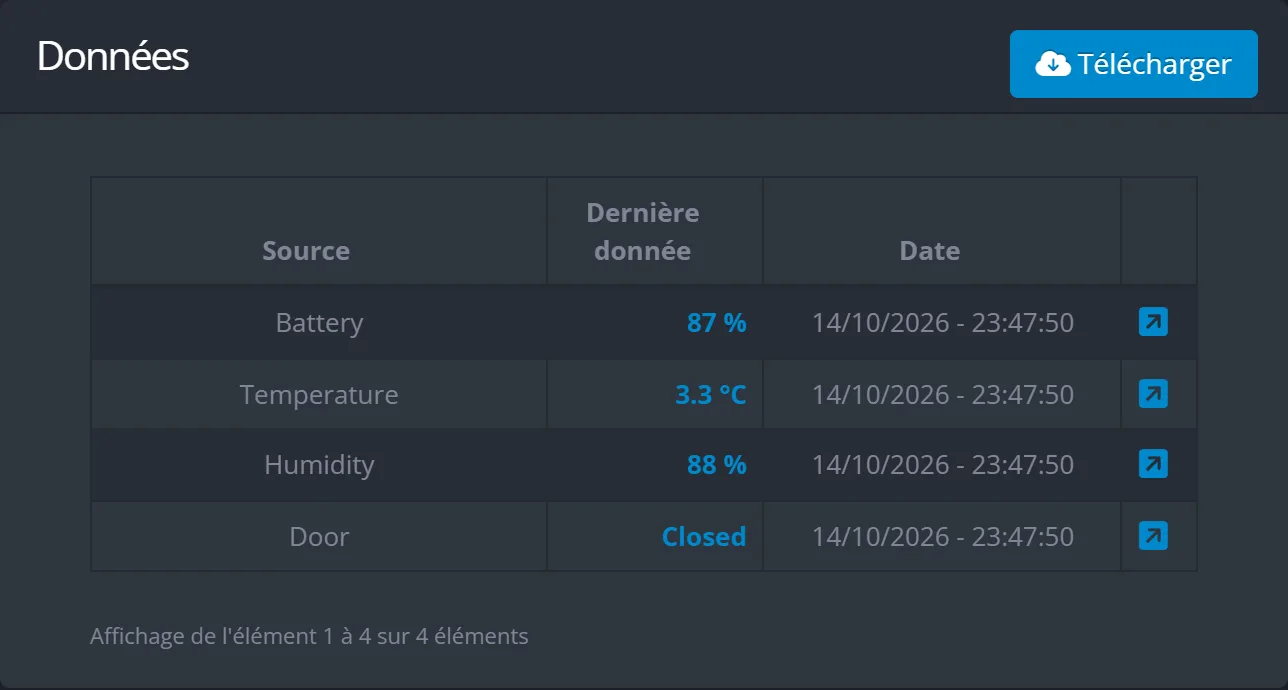
    Diagram: the sensor sends its message by radio to a LoRaWAN gateway, which forwards it to Telemesure. Other networks are possible: Sigfox, 4G / LTE-M, Internet, satellite. Enlarge the screenshot: “Data” table on the probe’s page in the portal: latest decoded values for the battery, temperature, humidity and door (closed), with the date they were received
    The radio message arrives translated: on the probe’s page, its latest values in plain language (demo data)
  3. Step 3: Telemesure analyses it

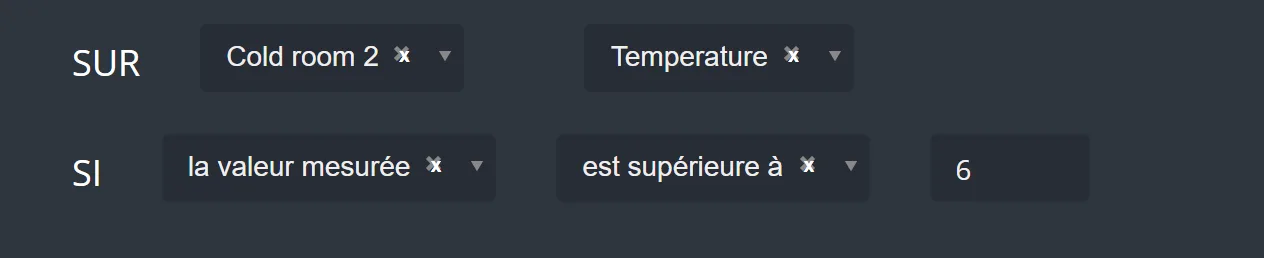
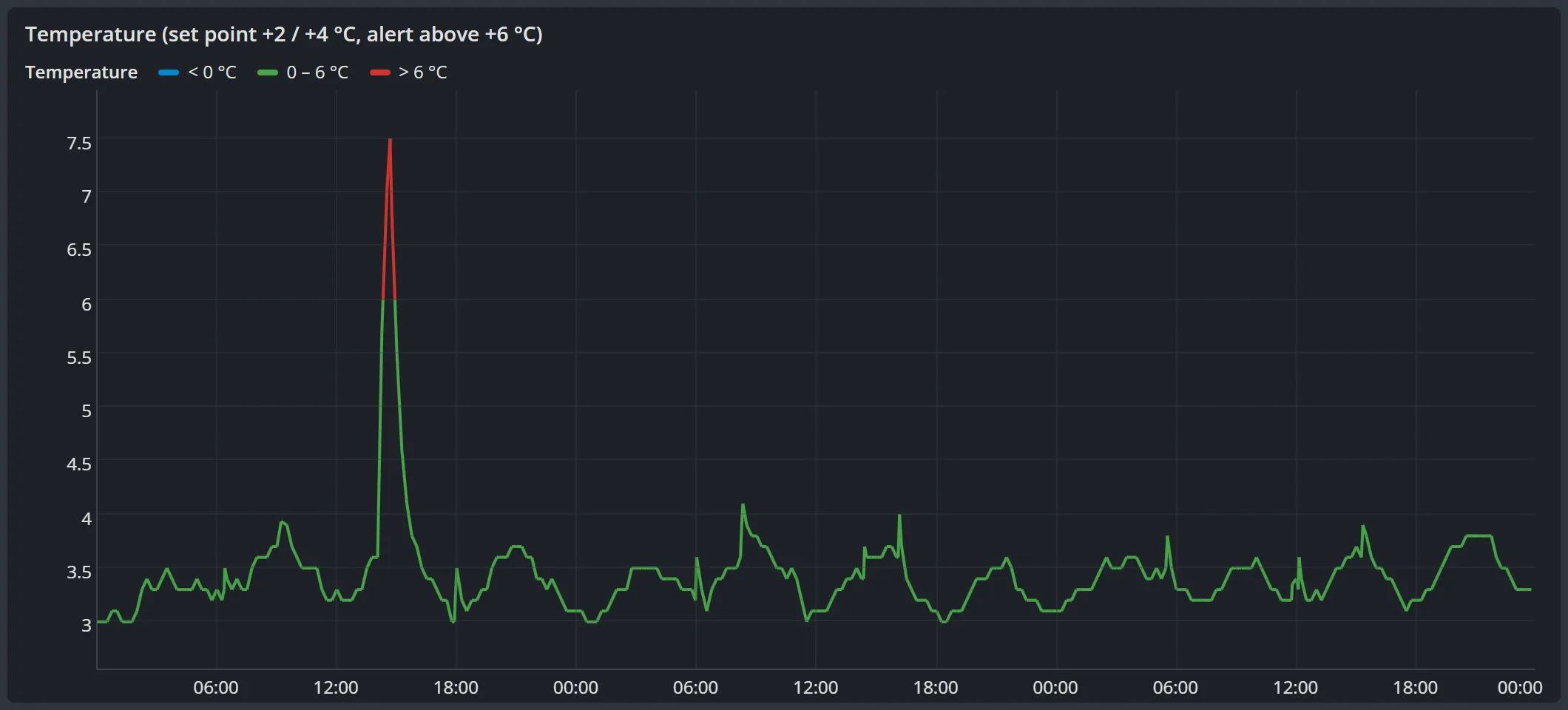
    Telemesure compares each reading with your rules. The rule for this cold room says: “if the temperature is above 6 °C, then Alert”. The reading is over the threshold: the alert is triggered straight away, and the chart turns red.

    Good to know. You create your rules with a guided form that reads like a sentence. A minimum duration means you are not disturbed by a door opened for a few seconds: here, the “door open” rule waits 10 minutes, and it had already sent a “Warning” alert at 14:16.

    Enlarge the screenshot: Condition of the “Cold room 2 temp.” rule in the portal: ON Cold room 2, reading Temperature, IF the measured value is greater than 6 Enlarge the screenshot: Temperature chart for cold room 2 over 3 days, coloured according to the thresholds: a red peak above 6 °C, up to 7.5 °C, then the return to around 3 °C
    The condition of the rule that triggered the alert, then the 3-day chart, in red above the threshold (demo data)
  4. Step 4: The right person is alerted

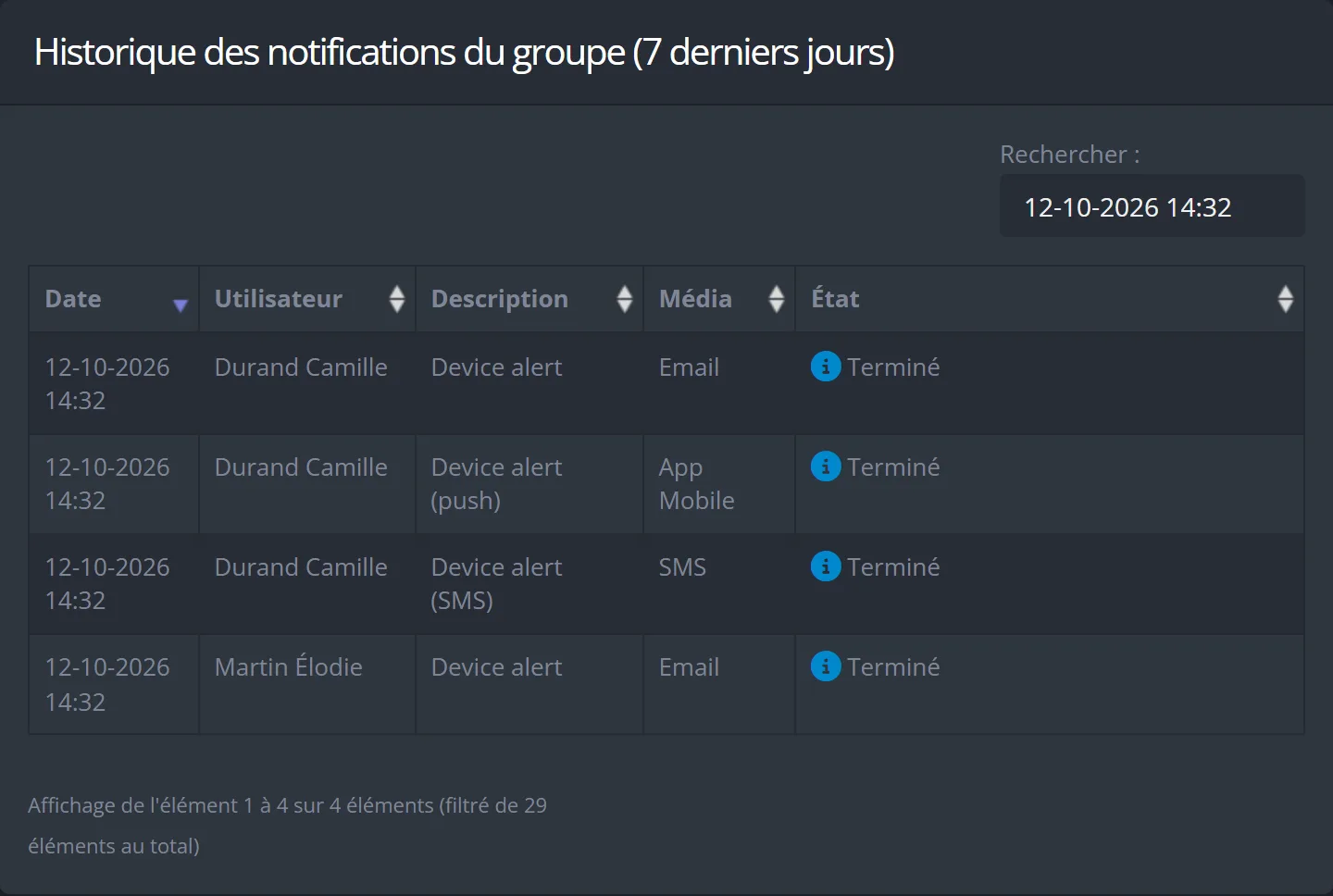
    It is a weekday, during working hours: the operations manager, Camille Durand, receives a text message, an email and a notification on her phone, and the quality manager is alerted by email. At night and at weekends, the on-call staff are called: Thomas Bernard first, then Julien Moreau, then Camille Durand.

    Good to know. You choose who to alert and how, depending on the severity and the time: email, text message, voice call or push notification. On the phone, a voice reads out the alert and pressing 1 acknowledges it. The calls stop as soon as someone has acknowledged it, or as soon as the situation is back to normal.

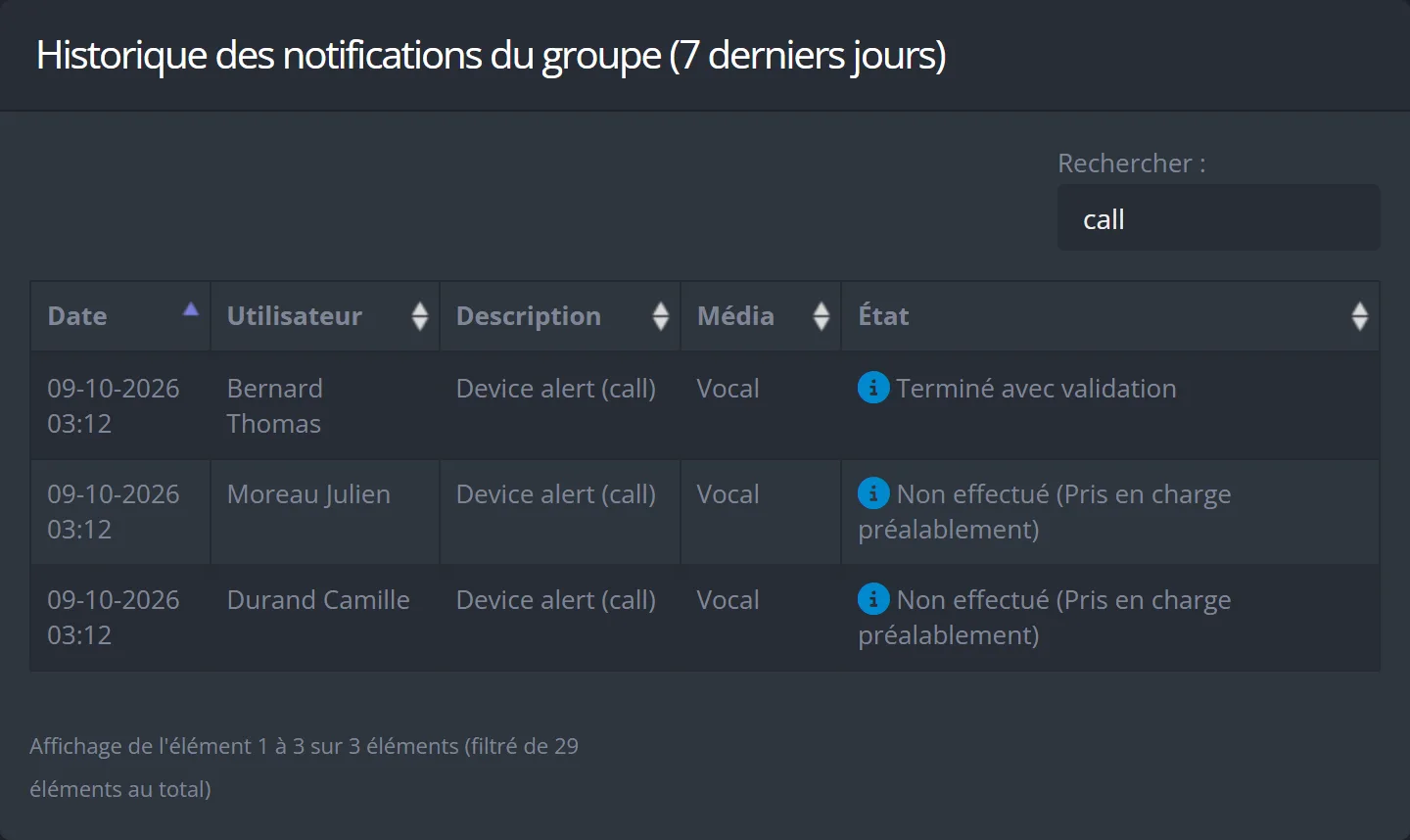
    Enlarge the screenshot: Notification history in the portal, searched for the 14:32 alert: Camille Durand receives a notification in the mobile app, an email and a text message, Élodie Martin an email, all with the status Completed Enlarge the screenshot: Notification history filtered on calls, for an alert on another night, at 03:12: voice call to Thomas Bernard “Completed with confirmation”, then Julien Moreau and Camille Durand “Not made (already acknowledged)”
    The notifications sent for the 14:32 alert, then, on another night, the on-call calls: the first person confirmed on the phone, so the next ones were not called (demo data)
  5. Step 5: You take action

    At 14:46, Camille Durand acknowledges the alert and leaves a comment: “Door left open during restocking. Core temperature of the products checked: compliant, no loss.” Once the door is closed, the temperature falls again, and the alert closes by itself at 15:02, as soon as the situation is back to normal.

    Good to know. An alert can be acknowledged from the portal, from the mobile app or by pressing 1 during a call. The next day, the manager finds everything in the portal: the chart, who acknowledged the alert, at what time, and their comment.

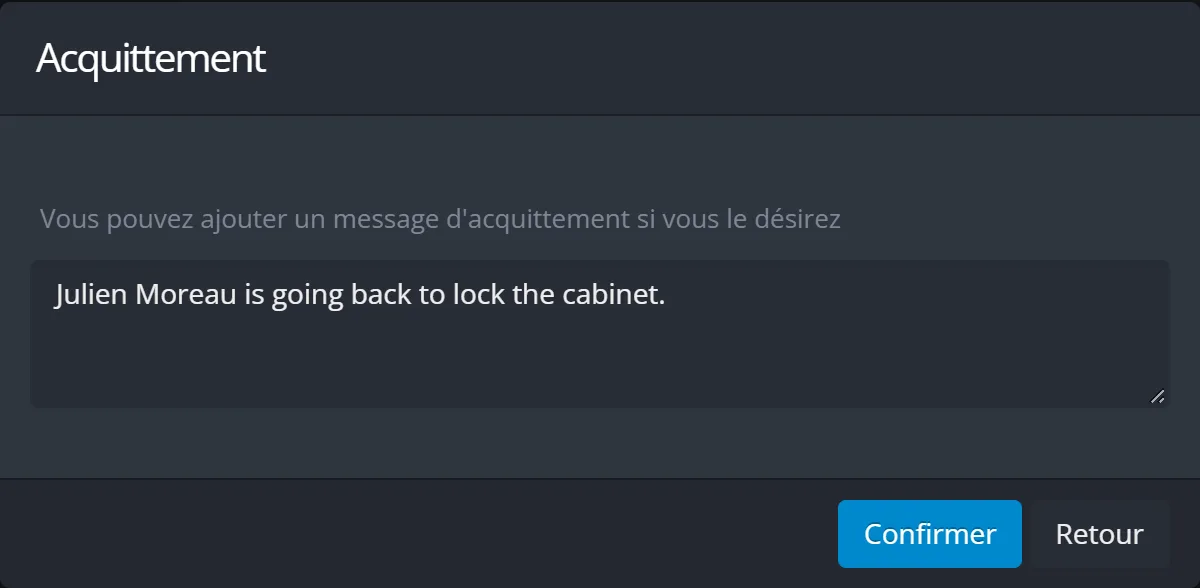
    Enlarge the screenshot: “Acknowledgement” window in the portal: an acknowledgement message typed for another alert, “Julien Moreau is going back to the cabinet to lock it.”, and the Confirm and Back buttons Enlarge the screenshot: Resolved alerts for cold room 2: temperature above 6 °C from 14:32 to 15:02 (Alert) and door open for more than 10 minutes from 14:16 to 14:42 (Warning), both acknowledged by Camille Durand. The tooltip shows her comment and the acknowledgement time, 14:46
    The acknowledgement window, where you can leave a message (here for another alert), then the cold room’s resolved alerts, with Camille Durand’s comment (demo data)

And it works the same way for all your devices.

A device that stops reporting, a tank that is nearly empty, a cabinet opened in the middle of the night, a machine moving at the weekend: same path, same reflexes.

Platform preview

A clear portal, at the office and in the field

A web portal for the office, and a mobile app for Android and iPhone for the field, with the essentials: the status of your devices, alerts and device pages.

Monitoring

All your devices at a glance

As soon as you sign in, you see how many devices are sending their data properly, how many have gone silent, and how many alerts are active for each severity level. A map shows the devices whose location is known.

  • The list of your devices, with search, groups and favourites
  • A page for each device: latest values, location, and battery level when the device reports it
  • Groups by site or by use, to find your way around
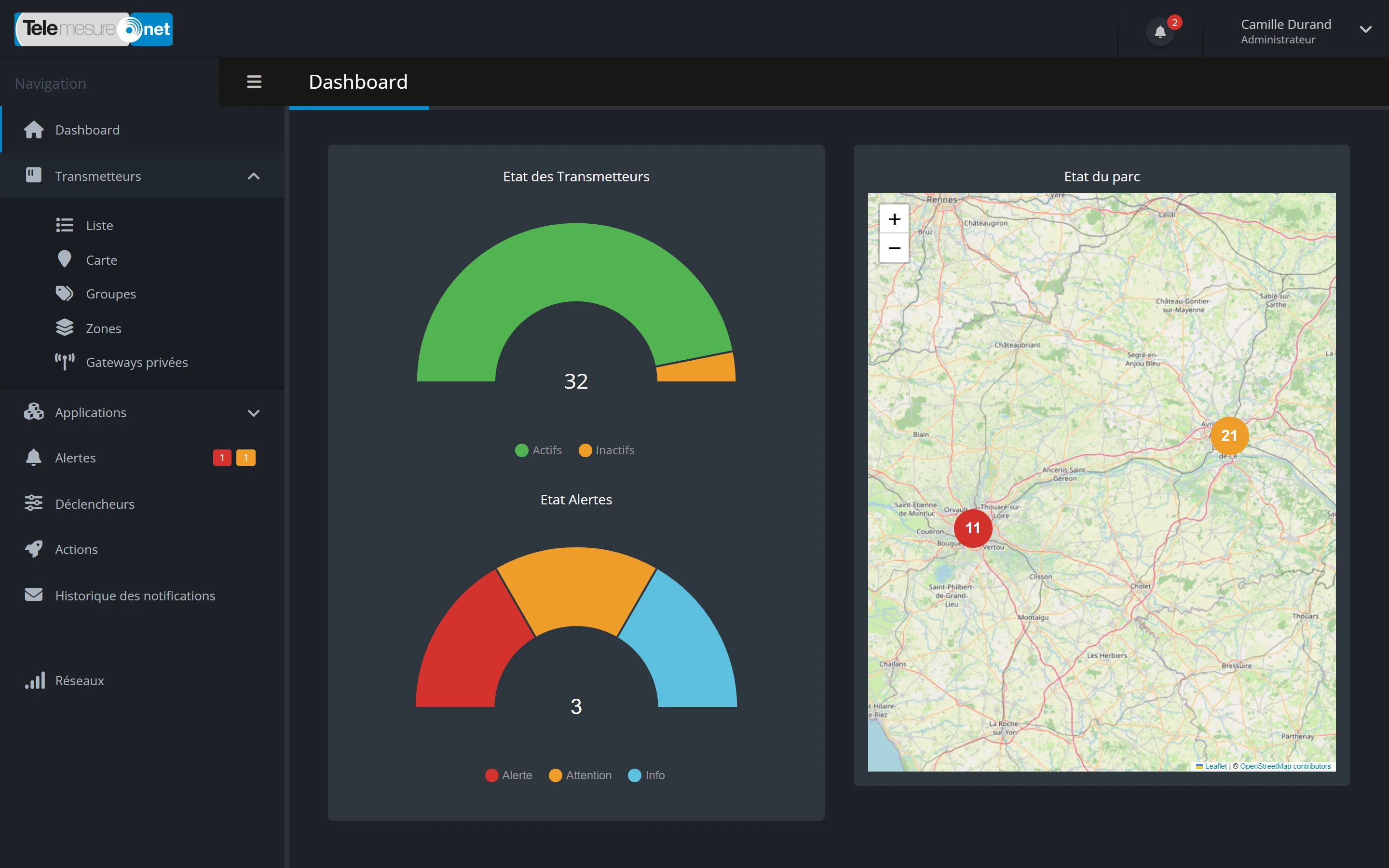
Enlarge the screenshot: Home page of the Telemesure portal in dark mode: gauge of active and inactive connected devices, gauge of active alerts by severity (Alert, Warning, Info) and map of the devices with two clusters, in Nantes and Angers
The portal home page: devices that are transmitting properly, active alerts by severity and the map of your devices (demo data)

Dashboards

Dashboards built your way

You place blocks on a grid: current values (coloured according to your thresholds), charts, status timelines such as “door open” or “door closed”. You choose the period, from the last hour to the last twelve months.

  • Automatic update every minute
  • Full-screen display, ideal for a wall screen
  • You decide who can edit the dashboards and who can view them
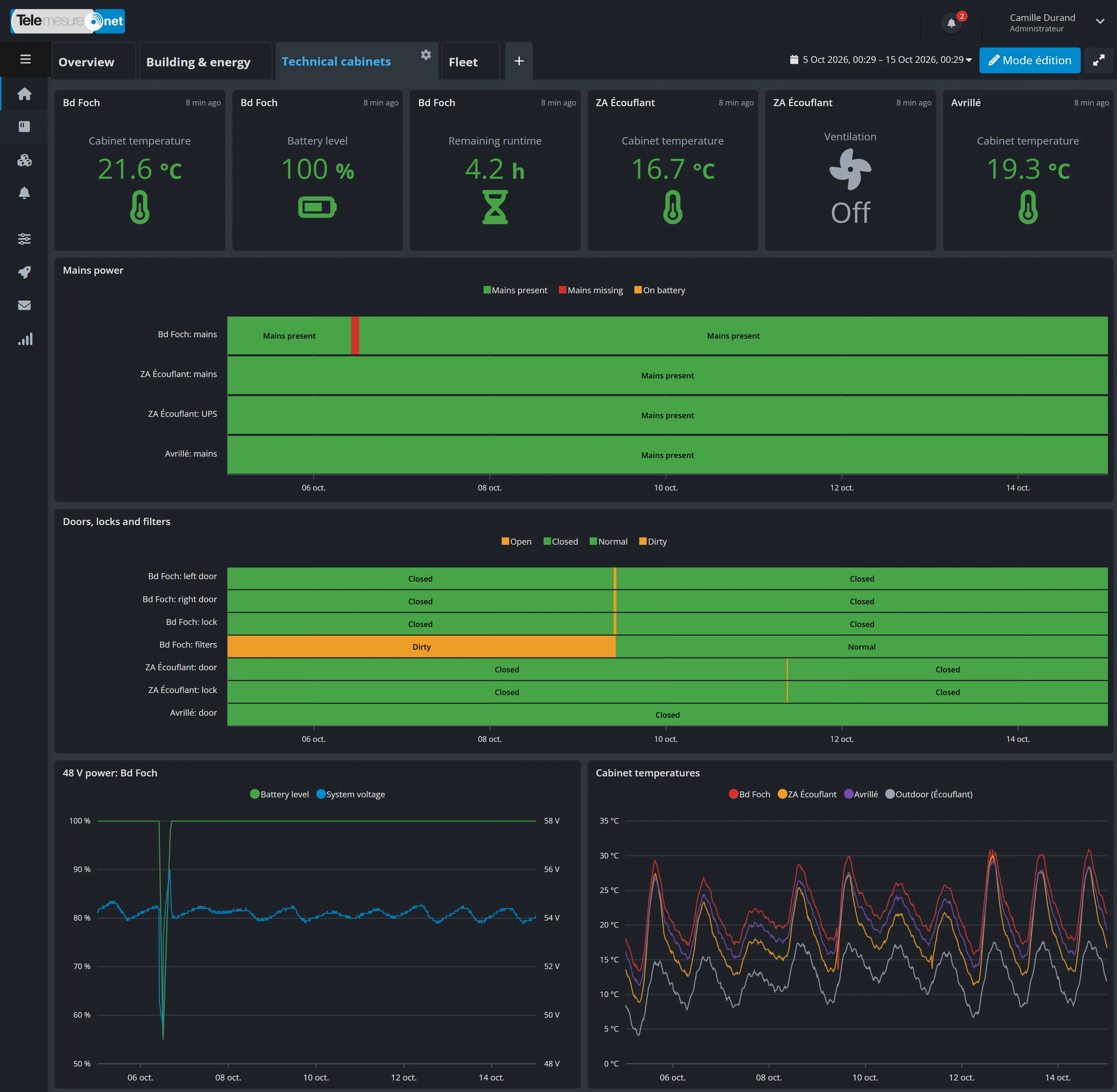
Enlarge the screenshot: “Technical cabinets” dashboard: latest temperature, battery, autonomy and ventilation values for the cabinets, mains power timeline with an outage, timelines for the doors, locks and filters, then the 48 V energy and the cabinet temperatures over 10 days
A dashboard for technical cabinets: current values, status timelines for the doors and the mains power, charts (demo data)

Alerts

Alerts that reach the right people

You create your rules with a guided form that reads like a sentence. Each rule has a severity level, and for each level you choose who to alert, how, and at what times of the week.

  • Chained voice calls: if nobody acknowledges, the next person is called
  • Acknowledgement from the portal, the app, or by pressing 1 during the call
  • An alert if a device stops reporting
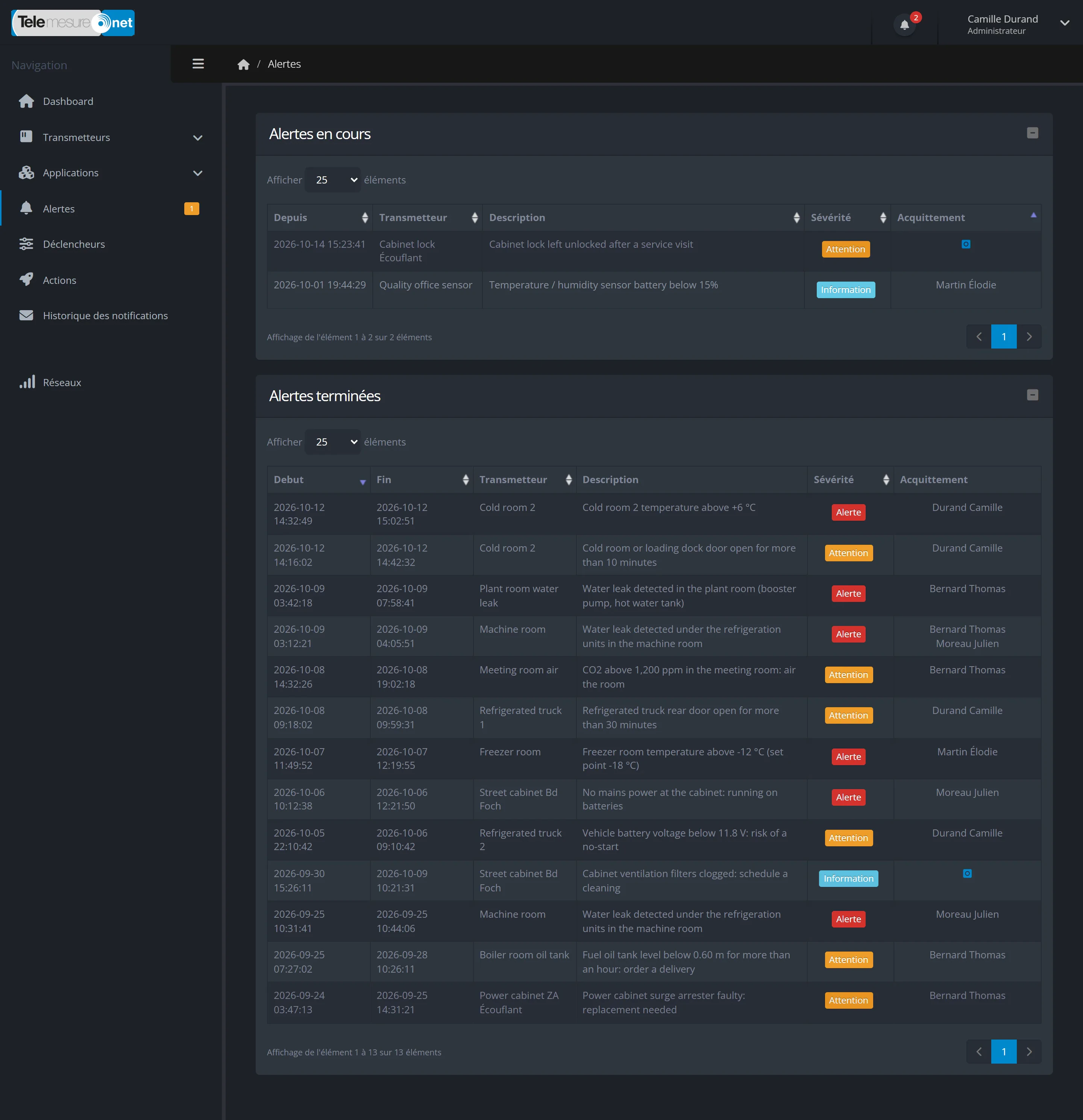
Enlarge the screenshot: Alerts page of the portal: two active alerts (Warning and Information), then the history of resolved alerts with the start, the end, the device concerned, the description, the severity and the person who acknowledged the alert
Active and resolved alerts, with their severity and the person who acknowledged them (demo data)

And also

All features
  • Mobile appAndroid and iPhone, alerts and device pages

  • Spreadsheet exportCSV file, link sent by email

  • PDF reports by emailAs often as you choose

  • To your softwareAutomatic forwarding of readings

  • Remote controlFor devices that allow it

  • Two-factor authenticationYour choice, on the web portal

Solutions by sector

Practical uses, in your sector

From food cold chains to industry, a few examples of what Telemesure can keep an eye on. Every project is different: let’s talk about yours.

All solutions by sector

Devices & networks

Your sensors, one portal

Probes, meters, GPS trackers: whatever their brand, supported models send their readings to the same portal.

  • More than 20 sensor manufacturers
  • Several dozen supported models
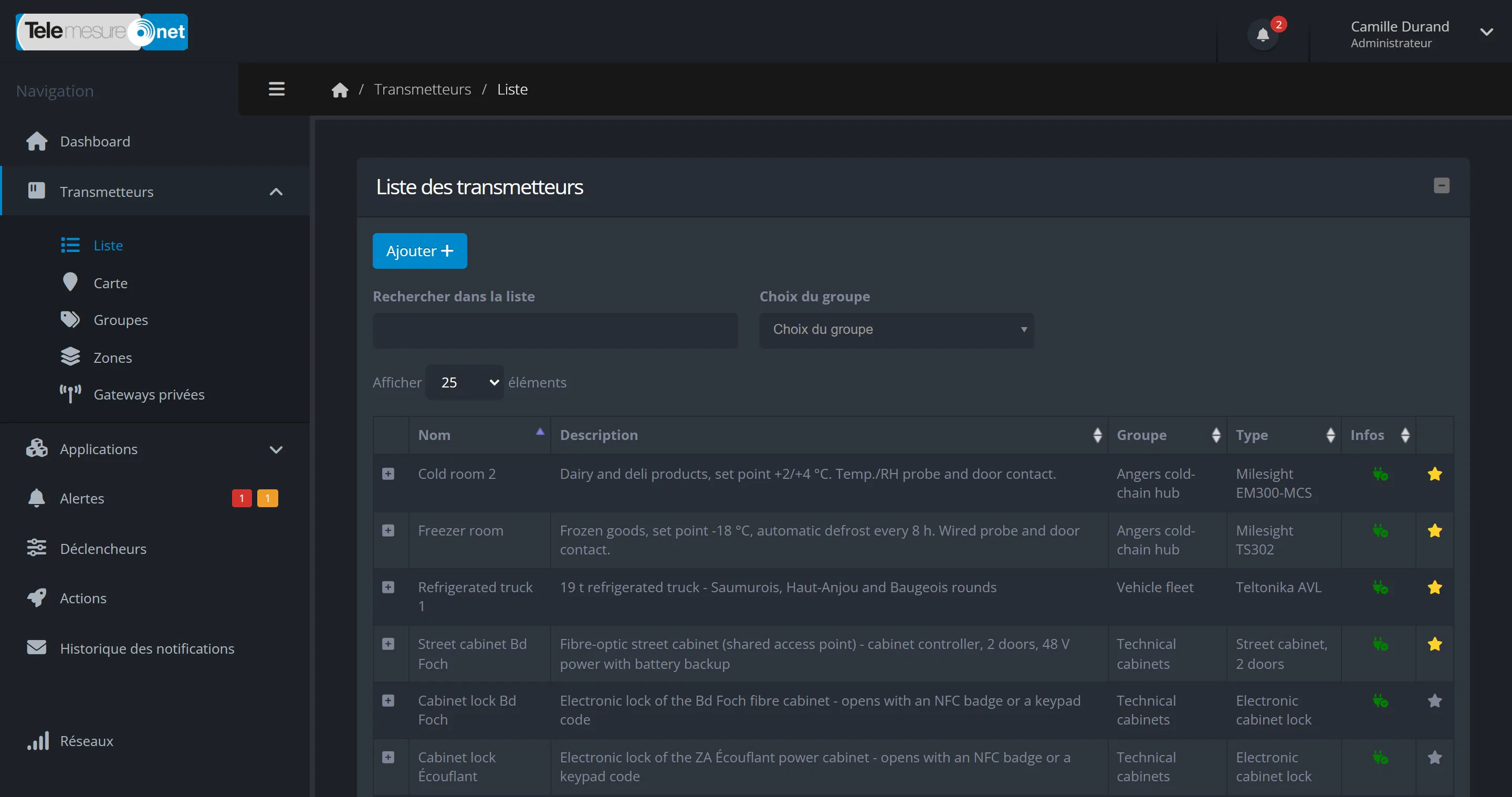
Enlarge the screenshot: List of transmitters in the Telemesure portal in dark mode: Milesight probes in the cold rooms, a refrigerated truck fitted with a Teltonika unit, a street technical cabinet and electronic cabinet locks, with their description, group and type
Cold room probes, truck tracker, technical cabinet and cabinet locks: all in the same list in the portal (demo data)

The networks used

  • LoRaWANA long-range radio network that uses very little energy. If your site has poor coverage, a private gateway can be installed there.

  • SigfoxA radio network for small messages, very energy-efficient, for sensors that send little data.

  • 4G / LTE-M mobile networkWith a SIM card dedicated to connected devices. LTE-M is a version of 4G designed for them.

  • InternetAny device or software able to send its data over the web.

  • SatelliteFor sites with no coverage at all.

What you can measure

  • Temperature and humidity
  • Air quality
  • Door opening
  • Water leaks
  • Electricity, water, gas
  • Tank level
  • GPS location
  • Presence and people counting
  • Soil moisture
  • Technical cabinets
  • Vibration
  • Call buttons

Your device is not on the list? We will look at connecting it with you.

See compatible devices and networks

Trust

A French platform, and your data stays yours

Published by Grolleau, a French manufacturer

Telemesure is published by Grolleau, a French industrial company that designs and manufactures technical cabinets, enclosures and technical shelters for the energy, telecoms and urban infrastructure sectors.

Publisher
Grolleau SA
Head office
Montilliers (Maine-et-Loire, France)
Governing law
French law

Telemesure, a Grolleau solution

  • Hosted in France

    The platform and your data are hosted in France, by French hosting providers: Scaleway (Paris) and OVHcloud.

  • Protected access

    Encrypted connections (HTTPS), passwords never stored in plain text and two-factor authentication available on the web portal. The administrator sets each user’s rights.

  • Your data belongs to you

    You can export it at any time in CSV format. At the end of the contract, your data is returned to you (this is known as reversibility), then deleted from the platform.

  • No advertising

    The portal uses no advertising cookies and no audience measurement tools: only the technical cookies it needs to work.

Your data and security

Request a demo

Let’s talk about what you want to monitor

Tell us which equipment and which sites are involved. We look at your needs and show you Telemesure on an example close to yours, with demo data.

Already a customer?

Access your account or ask our team a question.

Support hours: Monday to Friday, 9:00 to 17:30 (Paris time), excluding public holidays.